
How to Pack a TV and Electronics for Shifting
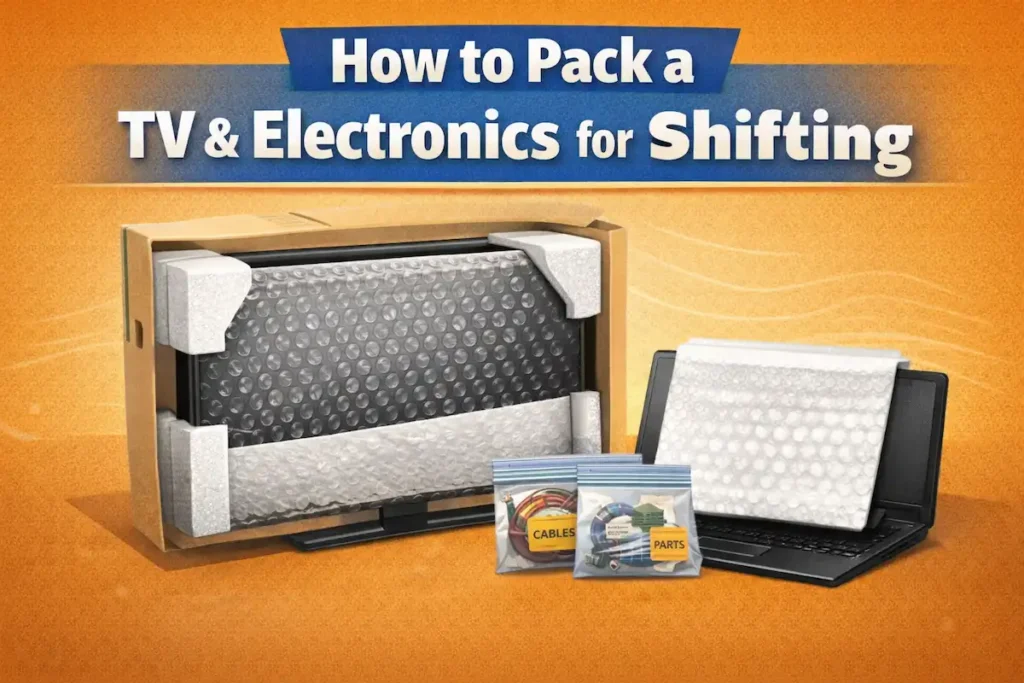
A modern flat-screen television is one of the most financially significant and physically fragile items in any household. LCD, LED, and OLED panels are designed for weight to be distributed around their edges while upright — not across the flat screen surface under pressure. A single rough bump during transport while the TV is laid flat can create dead pixels, flickering lines, or permanent screen cracks. The same applies to laptops, desktop computers, gaming consoles, and other electronics where internal components, solder joints, and screen surfaces are vulnerable to vibration, static electricity, and impact.
This guide covers the correct technique for packing every major electronic item found in an Indian household — flat-screen TVs, laptops, desktop towers, and accessories — using methods verified from professional moving practice. Every step is explained with the reason behind it, so you understand not just what to do but why it matters when working with experienced packers and movers in Lucknow.
About Alliaance Packers And Movers: We have handled electronics as part of household shifting in Lucknow since 2013. Our crew brings TV-specific moving boxes, anti-static foam, bubble wrap, corner protectors, and foam sheets on every job. Call +91 7398073201 for a free pre-move survey.
Table of Contents
- Packing Materials Checklist
- Pre-Packing Preparation
- Packing a Flat-Screen TV (Step-by-Step)
- Safe TV Transport Guide
- Packing Laptops & Electronics
- Loading Electronics in Truck
- Common Packing Mistakes
- How Alliaance Handles Electronics
- FAQs
Packing Materials You Will Need
Getting the right materials before you start is essential. Using the wrong material — particularly applying tape directly to a screen or using standard packing peanuts on circuit boards — causes more damage than using nothing at all.
| Material | Used For | Important Note |
| TV-specific moving box or original TV box | Outer rigid container for flat-screen TV | Measure TV diagonally from corner to corner to get the correct box size. Original box is best — custom foam inserts are designed exactly for your model. |
| Bubble wrap (large bubbles for impact, small bubbles for screens) | Second protective layer over packing paper; wrapping corners | Apply with bubbles facing inward against the item. 2–3 layers for TV screens. Never apply directly to OLED panels — use foam sheet first. |
| Foam sheets / EPE foam | Screen surface protection; lining box interior; padding between laptop screen and keyboard | Provides uniform surface protection. Use between screen and keyboard for laptops. |
| Foam corner protectors | All 4 corners of flat-screen TVs and monitors | Corners are the most impact-vulnerable point. Foam corners absorb direct edge hits. |
| Moving blanket / furniture pad | Outer protective layer over wrapped TV | Absorbs bumps and shocks; protects against scratches on external surfaces. |
| Anti-static bags (pink/metallic) | Graphics cards, RAM sticks, SSDs, hard drives, motherboards | Standard bubble wrap and packing peanuts can generate static electricity that permanently damages circuit boards. Anti-static bags are mandatory for exposed computer components. |
| Packing paper (unprinted newsprint) | First layer on TV screen before bubble wrap | Prevents direct bubble contact with delicate screen surface. Never use newspaper — ink transfers. |
| Stretch film / plastic wrap | Holding blankets in place around TV; securing accessories | Applied over the blanket layer, not directly on screen or electronics surface. |
| Resealable plastic bags (labelled) | Cables, remotes, screws, wall mount brackets | One bag per device. Label each bag with device name and which ports cables connect to. |
| Heavy-duty packing tape | Sealing all boxes securely | Do not apply to TV screen, frame, or any electronics surface. Apply only to wrapping materials or box seams. |
| Permanent marker | Labelling boxes and bags | All electronics boxes: FRAGILE + THIS SIDE UP + contents description on multiple sides. |
| Silica gel packets | Inside TV box and electronics boxes to absorb moisture | Prevents condensation damage, particularly on long-distance intercity moves. |
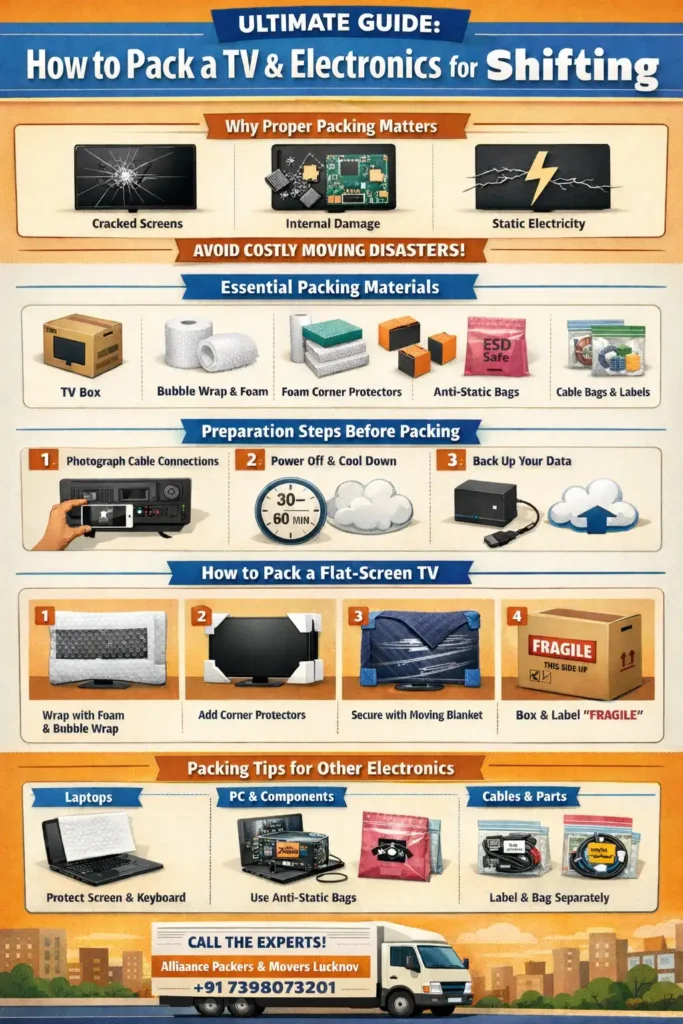
Before You Start Packing: Essential Preparation Steps
These preparation steps apply to all electronics. Skipping any of them creates problems either during the move or when setting up at the destination.
Step 1: Photograph every cable connection before disconnecting
Before unplugging a single cable, take a clear photo or short video of the back of every device — television, set-top box, sound bar, desktop computer, gaming console. This reference image tells you exactly which cable goes where when reconnecting at your new home and saves significant time during setup.
Step 2: Allow devices to cool completely before packing
Never pack electronics that are still warm from use. Powered electronics retain heat. Packing a warm device traps that heat inside the wrapping materials, which can damage internal components. Power off each device and allow at least 30–60 minutes before handling and wrapping.
Step 3: Back up all data before packing computers
Before disassembling or packing any computer, back up all important data to an external hard drive and a cloud service. Moving involves vibration, jolts, and handling by multiple people. Data on an internal hard drive can be corrupted or lost if the drive is damaged during transit. Once backed up, safely eject all external storage devices before packing.
Step 4: Disconnect, label, and bag all cables
Disconnect cables one at a time. Immediately after removing each cable, label it with a small piece of masking tape identifying where it connects — for example: ‘HDMI – TV to set-top box’ or ‘Power – Desktop’. Bundle each device’s cables together with Velcro straps or a loose knot, and store in a labelled resealable bag. Do not wrap cables tightly — tight coiling stresses the connectors and internal conductors.
⚠ Be especially careful when disconnecting HDMI, coaxial, and optical audio cables. These cannot handle bending at sharp angles. Hold the plug body when pulling, never the cable itself. Even slight bending of a coaxial cable can break its inner conductor, causing a dead connection.
Step 5: Remove accessories and pack separately
Remove all accessories before packing the main device: TV stands and wall mount brackets, remote controls (remove batteries and store separately to prevent corrosion or leakage), gaming console controllers, laptop chargers. Pack and label each group of accessories in its own bag or small carton. Store batteries in a dedicated container — not loose in a bag.
How to Pack a Flat-Screen TV: Step-by-Step
Modern flat-screen TVs — LCD, LED, OLED — are designed for weight to be distributed around the edges while upright. When the TV is laid flat, the screen’s own weight creates pressure points that stress the delicate display panel. Even a small bump or vibration during transport in that position can cause permanent damage: dead pixels, flickering lines, or distorted images.
Option A: Using the original TV box (recommended)
The original factory box is the best packing option for any television. It was designed specifically for your TV model, with custom-fitted foam inserts that hold the TV in exactly the right position, preventing any movement or contact between the screen and the box walls.
- Open the original box and check that all foam inserts are present and undamaged.
- Wrap the screen side first with a layer of foam sheet or small-bubble bubble wrap. This prevents any direct contact between the screen surface and the foam inserts.
- Place foam corner protectors on all 4 corners.
- Slide the TV into the original box. If the box has two interlocking sections (inner shell + outer box), fit the inner shell around the TV first, then slide into the outer box.
- Seal all box seams with packing tape. Even if the original box looks intact, reseal every edge. Original box tape loses adhesion over time.
- Label all sides: FRAGILE — SCREEN SIDE [indicate which face] — THIS SIDE UP — ELECTRONICS.
Option B: Using a TV moving box (no original box)
TV-specific moving boxes are available at packing supply shops and hardware stores. These are adjustable and fit a range of screen sizes. To find the correct size: measure your TV diagonally from one corner of the screen to the opposite corner, then add a few centimetres for the frame and bezel. This diagonal measurement is your TV size for box selection.
- Clean the TV screen gently with a dry microfibre cloth to remove dust and fingerprints. Any grit on the screen can scratch the display during wrapping. Never spray liquid directly onto the screen — apply to cloth first.
- Place a layer of foam sheet or packing paper directly over the screen surface. This is the first layer and provides the cleanest contact surface.
- Add foam corner protectors to all 4 corners.
- Wrap 2–3 layers of bubble wrap around the entire TV — screen, back, sides, and all corners. Keep bubble side inward. Secure with packing tape applied only to the bubble wrap, not to the TV surface or frame.
- Drape a moving blanket over the wrapped TV for an additional outer protective layer against impact and scratches.
- Open the TV moving box and line the interior bottom with foam or crumpled packing paper.
- With an assistant holding the box, stand the TV upright and carefully lower it into the box. The TV must go into the box upright — never lay it flat inside the box.
- Fill all gaps on all sides with crumpled packing paper or foam pieces until nothing can shift when the box is gently shaken.
- Place silica gel packets inside before sealing — these absorb moisture during long-distance transit.
- Seal the box securely with packing tape on all seams. Label all sides: FRAGILE — SCREEN FACING [direction] — UPRIGHT ONLY — THIS SIDE UP.
⚠ Never apply adhesive tape directly to the TV screen, frame, or any plastic surface. Tape adhesive damages these surfaces when removed and can leave permanent residue. All tape goes on the bubble wrap or box only.
Option C: Without a box — minimum safe technique
If a TV-specific box is genuinely unavailable, the minimum safe technique is: foam sheet on the screen, corner protectors on all 4 corners, 2–3 layers of bubble wrap around the entire unit, moving blanket draped and secured with stretch film. Transport the wrapped TV upright, positioned between two mattresses or sofa cushions in the truck with straps securing it. This method provides less protection than a rigid box — use it only as a last resort and never for intercity moves.
How to Transport a TV Safely
Even a correctly packed TV can be damaged by poor transport decisions. These rules apply regardless of how well the TV is packed.
Keep the TV upright at all times
The single most important transport rule. When a TV is laid flat, the screen’s own weight creates pressure on the delicate LCD or OLED panel. Any bump or vibration during transport converts that pressure into stress fractures that produce dead pixels, flickering lines, or permanent distortion. Keep the TV upright throughout: while waiting, while loading, while in the truck, while unloading.
💡 If you need to set the boxed TV down temporarily while arranging the truck, stand it upright against a wall and have someone hold it steady. Even a few minutes of lying flat while sorting logistics can cause the internal problems you have worked to prevent.
Securing in the truck
Position the TV box upright against the truck wall or between two stable, soft items such as mattresses or sofa cushions. These provide a protective buffer on both sides. Secure the box with ratchet straps or moving straps around the packaging — ensuring the TV cannot shift during braking or cornering. Do not place any heavy boxes on top of or leaning against the TV box.
Temperature protection
Avoid leaving the TV in a parked vehicle for extended periods, particularly during extreme heat (above 35°C) or cold (below 5°C). High heat can harm the screen, damage adhesive layers inside the panel, and warp plastic components. Cold causes condensation inside the device when it is later moved to a warm room, which can cause short circuits when the unit is powered on.
After transport in extreme temperatures, allow the TV to reach room temperature — at least one hour, ideally longer — before plugging in. Silica gel packets inside the box help absorb moisture during this acclimatisation period.
How to Pack Laptops, Desktops, and Other Electronics
Each electronic device category has specific packing requirements. The common thread is anti-static protection for any exposed component, individual packing for each device, and a minimum of 5–8 cm of cushioning on all sides.
Packing a laptop
- Back up all data before packing. Use both cloud storage and an external hard drive for redundancy.
- Power down completely and allow the laptop to cool for at least 30 minutes before handling.
- Close the lid. Place a thin foam sheet or clean microfibre cloth between the screen and keyboard before closing — this prevents keyboard keys from pressing against the screen surface during transit.
- Slip the laptop into a padded sleeve if available, or wrap the entire closed laptop in 2 layers of bubble wrap. Secure with tape to the bubble wrap, not to the laptop surface.
- Place in a snug box with a minimum of 5 cm of foam or crumpled paper on all sides. The laptop should not be able to move when the box is shaken.
- Pack charger, mouse, and accessories in a separate labelled bag in the same box.
- Label the box: FRAGILE — LAPTOP — THIS SIDE UP.
💡 A laptop is small enough to carry in your personal bag or luggage during the move. This is the safest option for local and intercity moves — it removes the laptop from the truck entirely, eliminating vibration exposure and temperature risk.
Packing a desktop tower (CPU)
Important: Standard bubble wrap and polystyrene packing peanuts can generate static electricity. Static discharge silently and permanently damages computer components — graphics cards, RAM, and motherboards are particularly vulnerable. Always use anti-static bags or anti-static foam for any exposed internal component.
- Back up all data on the hard drive before disassembly.
- If comfortable with hardware: remove the graphics card (GPU) and pack it separately in an anti-static bag with foam padding on both sides. A heavy GPU can break the PCIe slot if the tower experiences vibration or impact during transit with the card still seated.
- If the GPU is left inside: open the case panel and place soft foam padding under the GPU to support its weight and prevent it from rocking on the PCIe slot.
- Coil all internal cables and secure them so they cannot shift and contact fans or other components during movement.
- Wrap the entire tower in 2–3 layers of anti-static bubble wrap (light pink in colour), paying extra attention to corners and glass side panels. Secure with tape to the wrap.
- Place in a sturdy double-walled box sized to allow a minimum 7–8 cm of cushioning on all sides. Line the bottom with foam or crumpled paper. Stand the tower upright — the same orientation as normal use.
- Fill all remaining gaps with foam pieces or crumpled paper until nothing shifts.
- Label: FRAGILE — DESKTOP PC — UPRIGHT — THIS SIDE UP.
Packing monitors and screens
Computer monitors and all-in-one desktop screens follow exactly the same packing process as flat-screen TVs. Measure diagonally, use a correctly sized TV/monitor moving box, wrap in foam sheet + bubble wrap with corners protected, pack upright, fill voids, label. Never lay flat in the box or in the truck.
Packing gaming consoles
Wrap the console in 2 layers of foam or bubble wrap. Place in a padded box that fits snugly — large consoles like the PlayStation 5 or larger Xbox models benefit from being packed in the original box if available, as this includes the correct foam inserts. Controllers, headsets, and accessories pack together in a separate labelled bag or small carton. Do not stack anything on top of the console box.
Quick packing reference: other electronics
Device | Key Packing Rules |
Tablet | Foam sheet between screen and keyboard/cover. Wrap in bubble wrap. Padded sleeve or snug box. Carry in personal bag if possible. |
Camera body and lenses | Wrap each lens individually in foam. Camera body in foam-lined case or bubble wrap. Pack in original box if available. Do not stack. |
Sound bar | Remove from wall mount. Wrap in foam sheet then bubble wrap. Pack upright or flat (check manufacturer guidance). Fill all box gaps. |
Router and networking equipment | Wrap in bubble wrap. Pack cables in labelled bags. Keep in carry-on bag if possible — small and easy to transport personally. |
External hard drive | Critical — carry personally, not in the truck. If it must go in the truck: anti-static bag, then bubble wrap, then a small padded box. Minimum 5 cm cushioning. |
Smart speakers | Bubble wrap + original box or snug carton. Cables and adapters in labelled bag. |
Loading Electronics in the Moving Truck: Placement Rules
How electronics are positioned in the truck matters as much as how they are packed. Correct placement prevents crushing, tipping, and vibration damage during the journey.
Rule | Why It Matters |
Electronics boxes go on top of heavier items — never underneath | Heavy boxes on top of electronics crush them, even when electronics are boxed. Stacking weight damages fragile screens and components. |
TV must remain upright throughout — secured with ratchet straps to truck tie-down rails | A TV laid flat in the truck, even well packed, bears pressure on the screen panel during every bump. One hard jolt is sufficient to cause permanent damage. |
Position TV between two stable flat surfaces (mattresses, sofa backs) | Creates a protective buffer on both sides. Prevents the TV from tipping if a strap loosens. |
Do not place anything on top of the TV box | TV box is not a load-bearing surface. Anything placed on top adds pressure to the screen. |
Electronics cartons furthest from the truck doors | Items near the doors are first to be jostled during loading and unloading, and are most exposed if the doors open in transit. |
Smaller electronics — laptops, external drives, cameras — travel in the personal vehicle if possible | Personal vehicles have climate control, smoother rides, and the electronics are under your direct supervision throughout. |
✅ Alliaance Packers And Movers loads all electronics using a defined sequence: electronics last in (first out), upright positioning, secured with ratchet straps. Our crew is trained on correct loading order and placement. For a free pre-move survey, call +91 7398073201.
Common Mistakes When Packing TVs and Electronics
Mistake | Why It Causes Damage | Correct Practice |
Laying the TV flat in the truck | Screen’s own weight creates pressure on LCD/OLED panel. Any vibration converts this into cracks, dead pixels, or flickering. | Always upright. The TV is designed to bear weight on its edges, not across its flat surface. |
Applying tape directly to the TV screen or frame | Adhesive residue permanently damages anti-glare coatings, plastic trim, and painted surfaces when removed. | All tape applied to bubble wrap or box only. Use stretch film to hold blankets in place without any adhesive contact. |
Using standard packing peanuts directly on computer components | Polystyrene packing peanuts generate static electricity that silently destroys graphics cards, RAM, and motherboards. | Use anti-static bags on all exposed computer components. Anti-static foam or anti-static bubble wrap inside the box. |
Skipping cable photos before disconnecting | When reconnecting at the new home, cables get mixed up and the setup process takes hours. | Photograph the back of every device before removing any cable. |
Using a box that is too large | Items shift inside the box during transport, colliding with the box walls on every bump. | TV fits snugly with no more than 5–7 cm gap on any side, filled with firm cushioning. No rattling when box is gently shaken. |
Plugging in immediately after exposure to temperature extremes | Condensation inside the device causes short circuits when powered on. | Allow electronics to reach room temperature for at least 1 hour before plugging in after transport in heat or cold. |
Mixing TV accessories with general household boxes | Remote controls, wall mount screws, and HDMI cables get lost in other boxes and cannot be found during setup. | All TV accessories in one labelled bag, stored inside the TV box or in a single dedicated ‘TV accessories’ carton. |
Wrapping OLED screens directly in bubble wrap | OLED panels are extremely thin and sensitive. Direct bubble wrap contact under pressure can leave marks on the panel. | Use foam sheet or microfibre cloth as the first layer on the screen surface, then bubble wrap over the foam. |
How Alliaance Packers And Movers Handles Your Electronics
Alliaance Packers And Movers has packed and moved televisions, laptops, desktop computers, gaming consoles, and home theatre systems as part of household shifting in Lucknow since 2013. Every electronics move follows a defined process with the correct materials.
| What Alliaance Provides | Detail |
| Free pre-move survey | Our crew visits your address before booking. All electronics are identified during the survey, and the correct box sizes, foam requirements, and packing sequence are confirmed before moving day — no improvisation on the day. |
| TV-specific moving boxes | Correctly sized TV moving boxes brought to your address. TV screen measurement confirmed at survey. Original box used if you have kept it. |
| Foam corner protectors + foam sheets | Applied to all 4 TV corners; foam sheet as the first screen contact layer before bubble wrap. OLED TVs receive foam sheet first, standard bubble wrap is not applied directly to OLED panels. |
| Bubble wrap (2–3 layers) | Applied over foam or packing paper on all TV and electronics surfaces. Secured to wrapping material only — no tape on any device surface. |
| Moving blanket + stretch film | Applied over bubble wrap layer on TVs and monitors as the outer protective shell. |
| Anti-static foam and bags | All exposed computer components packed with anti-static protection. Desktop GPUs assessed at survey and packed separately if applicable. |
| Cable management | All cables photographed, labelled, bagged per device, and stored in a dedicated carton or inside the TV box. |
| Silica gel packets | Placed inside TV boxes and electronics cartons for long-distance intercity moves. |
| Upright loading and securing | All TVs and monitors loaded upright in the truck, positioned between stable surfaces, and secured with ratchet straps. |
| Payment structure | 5% at booking · 85% at loading · 10% at delivery |
Get a Free Quote in 30 Seconds!
Tell us your move details and our team will call you back within 15 minutes — 7 days a week.
“Pay only 10% on delivery — after you are satisfied”
✅ No spam · No hidden charges · Call within 15 mins
🔒 Your information is 100% safe and never shared
⭐ 800+ families trust Alliaance Packers And Movers
📞 Prefer to call?
Frequently Asked Questions
No. This is one of the most damaging mistakes when moving a television. Flat-screen TVs are designed to bear weight on their edges while upright — not across the flat screen surface. When laid flat, the screen's own weight creates pressure points on the LCD or OLED panel. Even a small bump during transport converts that pressure into permanent damage: dead pixels, flickering lines, or distorted images. Always transport TVs upright, secured to the truck wall with ratchet straps.
The original TV box is the best option — it was designed specifically for your TV model with custom foam inserts that hold the TV in exactly the right position. If you no longer have the original box, purchase a TV-specific moving box in the correct size. To determine the right size: measure diagonally from one corner of the screen to the opposite corner. This diagonal measurement is your TV size for box selection. Add a few centimetres for the frame and bezel.
Not directly against computer components. Polystyrene packing peanuts generate static electricity that can permanently damage graphics cards, RAM, motherboards, and hard drives — often without any visible signs, discovered only when the computer fails to work after the move. Use anti-static bags (pink or metallic) for any exposed computer components. Anti-static bubble wrap or anti-static foam is the correct padding material inside the box. Packing peanuts can be used as void fill in the outer box as long as components are already protected in anti-static bags and bubble wrap.
Measure the TV diagonally from one corner of the screen to the opposite corner. This gives the screen diagonal measurement — which is what TV size means (e.g., a 55-inch TV has a 55-inch screen diagonal). Add a few centimetres for the frame and bezel width to get the total dimensions you need when choosing a moving box. TV moving boxes are typically labelled by the screen size range they accommodate.
Yes, if you are comfortable with hardware. A dedicated graphics card (GPU) is a heavy component seated in a PCIe slot. During transport, truck vibrations can cause the GPU to rock in its slot or partially unseat, which can damage both the card and the slot. Remove the GPU, store it in an anti-static bag with foam padding on both sides, and pack it in a separate small labelled carton. If you are not comfortable removing it, place soft foam padding inside the case under the GPU to support its weight before packing the tower.
If the electronics were transported in normal temperature conditions: wait at least 30 minutes for the device to settle before powering on. If the electronics were stored in a hot vehicle or transported in cold conditions: allow the device to reach room temperature — at least 1 hour, ideally longer. Plugging in electronics that have been in extreme heat or cold before they acclimatise causes condensation on internal components, leading to short circuits when the device is powered on. Silica gel packets inside the box during transit help absorb moisture and reduce this risk.
Book Safe Electronics Shifting Today
Protect your valuable TV, laptops, and electronics with expert packing and secure transport. Alliaance Packers and Movers ensures damage-free relocation using professional materials and trained staff. Get a free pre-move survey, accurate pricing, and hassle-free service. Call now or WhatsApp us to schedule your move today.